

直接在 MetaTrader 中执行
连接你的经纪商,一键或全自动执行 AI 信号。
Three ways to execute
From manual to fully automated — you pick the level of control. Same signals and same risk limits in every mode.
Manual in the app
The AI publishes the signal with entry, stop and targets. You decide and execute at your broker — from anywhere, even your phone.
- Nothing to install
- Works with any broker
- The final call is always yours
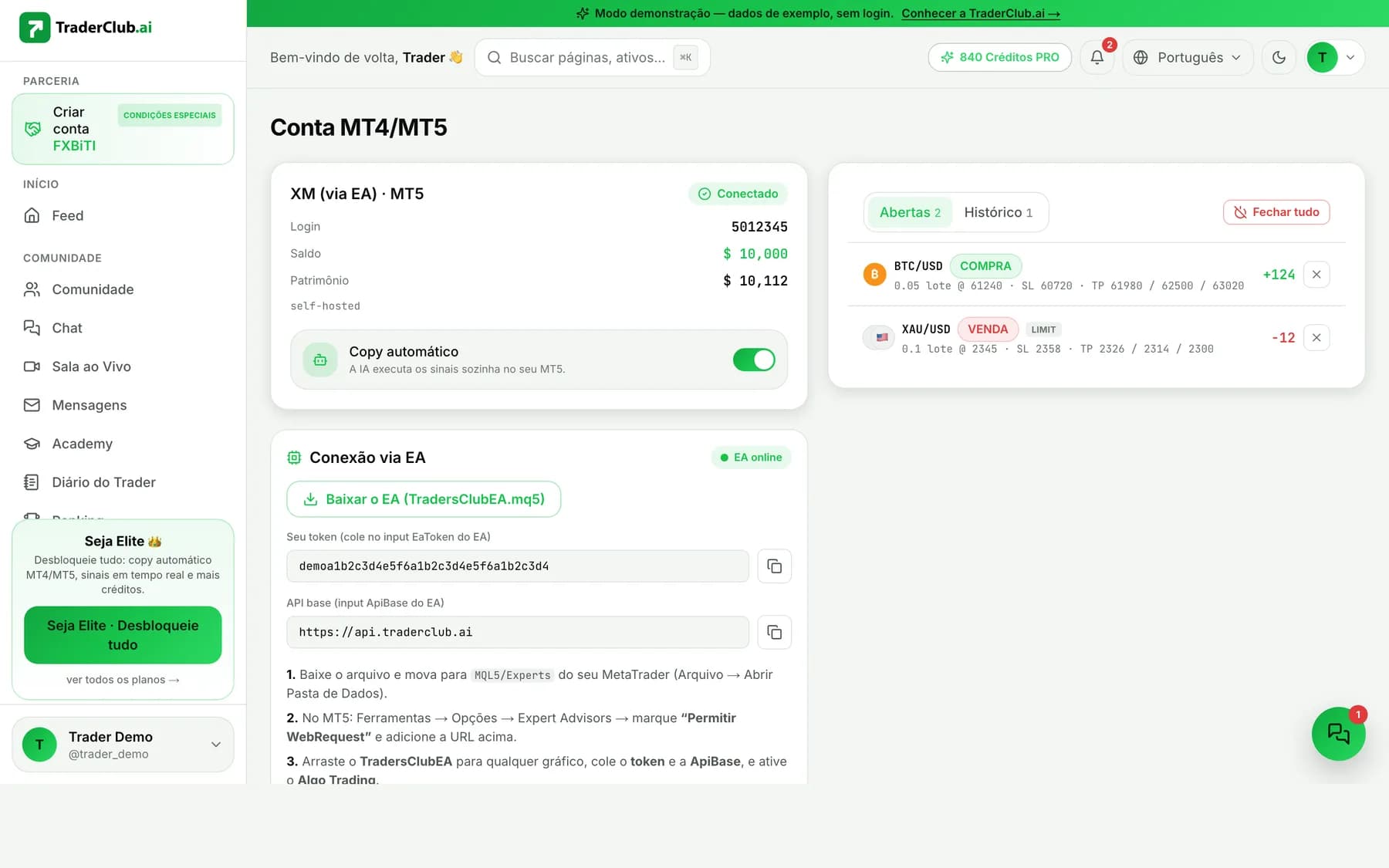
EA in your MT5
The Expert Advisor runs inside your MetaTrader 5 and executes signals straight into your account. Free, zero-custody, with HMAC validation on every order.
- Your password never leaves your machine
- HMAC-signed orders — forged ones never execute
- Free: MT5 is free + our EA is free
Auto copy + risk limits
The AI executes only high-confidence signals on its own, always within the limits you set: max daily loss, lot size and risk per trade.
- High-confidence signals only
- Your limits always apply
- Kill-switch pauses everything instantly
Without a broker connected, the platform runs in demo mode (sample data). Trading involves real risk — nothing here is a promise of returns.
Install the EA in 4 steps
From zero to connected in a few minutes. No step ever asks for your broker password.
- 1
Generate your token in the app
In the TraderClub.ai Execution area, generate your connection token. That's what authenticates your EA — we never ask for broker logins.
- 2
Download TradersClubEA.mq5
Drop the file into your MetaTrader 5 MQL5/Experts folder and refresh the Navigator (right click → Refresh).
- 3
Allow WebRequest
In Tools → Options → Expert Advisors, enable “Allow WebRequest” and add the TraderClub.ai API URL to the list.
- 4
Drag it onto a chart and turn Algo Trading on
Paste the token into the EA's parameters, drag it onto a chart and enable the Algo Trading button. Done: the EA starts receiving signed signals.
What you need to know
No fine print — how execution actually works.
Desktop or VPS — phones don't run bots
The EA runs on desktop MetaTrader 5 or on a VPS. The MT5 mobile app does not run Expert Advisors — on your phone you monitor and trade manually.
MT5 today, MT4 soon
The EA is built for MetaTrader 5. The MT4 version is in development — if your broker only offers MT4, you can trade manually in the meantime.
Running the EA is free
MetaTrader 5 is free and so is our EA. The only optional cost is a VPS (~US$10–15/month) if you want it running 24/7 without leaving your PC on.
Start on demo
Without a broker connected, the platform runs in demo mode. We recommend testing the EA on a broker demo account before trading real money. No result is guaranteed.
Execution questions
Does running the EA cost anything?
No. MetaTrader 5 is free and so is TradersClubEA — no extra execution fee. The only optional cost is a VPS (~US$10–15/month) for those who want 24/7 without a PC on.
Do I need to leave my PC on?
For automated execution, yes — the EA only trades while MT5 is open. If you don't want to leave a computer on, a VPS solves it. And manual mode works from anywhere, including your phone.
Can you see my broker password?
No. The EA runs on your machine and it is the EA that talks to your broker — your credentials never reach our servers. The platform only sends HMAC-signed signals.
Does it work with any broker?
It works with any broker that offers MetaTrader 5 — the EA talks to MT5, not to the broker directly. The MT4 version is in development.
What if the EA goes offline?
Nothing executes blindly: signals go into a queue and orders older than 10 minutes expire automatically. When the EA comes back, it only processes what is still fresh — never a stale entry.